
Security, built inside Microsoft 365.


A signed contract won’t stop a stolen password.
A business associate agreement ()BAA: business associate agreementThe HIPAA contract a vendor signs that makes it responsible for protecting your clients’ information. does not protect you if someone has your password. A breach usually starts with an ordinary stolen password, so this is where the risk usually lives, and how the design answers it.
- A shared front-desk login
- Not possible here. Everyone has their own login, so every action is tied to one person, and each person sees only what their role needs.
- A reused or stolen password
- Your team signs in with their Microsoft account, and your practice can require a second check on their phone, called multi-factor authentication ()MFA: multi-factor authenticationA second check at sign-in, like a code on your phone, so a stolen password alone is not enough., so a stolen password alone doesn’t get in. We never store your staff’s passwords: they stay with Microsoft (Entra ID: Microsoft Entra IDMicrosoft’s sign-in service (formerly Azure AD). Your team signs in to Therapist Genie® with the same Microsoft account they use for email.).
- A sign-in from somewhere your practice doesn’t operate
- Your practice can refuse sign-ins from states or countries where you don’t work, with Microsoft’s Conditional accessSign-in rules your practice sets in Microsoft 365, such as refusing sign-ins from countries where you don’t work..
- A contractor who left last month
- Remove them once in Microsoft 365 and their access ends everywhere at once: the record, the files and the team chats.
- A transcript pasted into a consumer chatbot
- The AI works inside the record. Any protected health information ()PHI: protected health informationAnything in a record that identifies a client and relates to their care. is scrubbed, client data never trains an AI model, and a clinician signs every note.
Why Therapist Genie® is built inside Microsoft 365
The platform opens inside Microsoft Teams as well as in a browser. Here is what building it there gives your practice.
No second workspace to learn
Clinicians already live in email and a calendar. Scheduling is real calendar scheduling, reminders come from a real mail system, the video is the video they already use, and the record opens in the window they already have open. Familiarity is a feature, and we designed for it on purpose.

Real product. Demo data.
Teams for the whole practice
Clinical staff, admin, supervisors, billers and remote contractors work in channels and chats with permissions from the same identity system as the clinical record.
- A private supervision channel is genuinely private.
- Multi-site practices give each location its own channels while practice-wide communication stays in one place.
- Educators, schools, universities and education programs give cohorts of associates and practicum students, their supervisors and program staff their own spaces, with announcements reaching the whole program while supervision groups stay confidential.

Real product. Demo data.
Back-office files in their own place
Policies, credentialing files, provider identifiers, contracts and training materials live in your practice’s own Microsoft storage: organized, permissioned, retained and searchable. It’s the same Microsoft 365 subscription that runs the clinical side, so there’s one place to look.
Cost, and your own Microsoft 365 Copilot
Telehealth, email, file storage and collaboration come with the Microsoft 365 subscription rather than as add-ons. A practice’s total spend shouldn’t rise while what it can do rises.
- Connect your own Copilot and ask your practice’s records a question in plain language, inside your Microsoft 365 tenant: which supervisees are short on hours this quarter, or revenue by provider month over month.
- As of September 2026, no competitor offers a Copilot connector. Copilot is optional and never a gate, and Copilot itself is licensed from Microsoft.
What we inherit, and what we designed
Microsoft’s layer is real and substantial, and it belongs to Microsoft. The layer on top is our own design.
Your practice and your clients’ records
Designed by Therapist Genie®
Who sees what
Everyone has their own login, and access follows their role.
The record
An Audit trailA record of who changed what in the record, and when. of who did what, and seven-year retention.
The AI
Client details are scrubbed, never used for training, and every note is signed by a clinician.
Clinical rules
Who may sign, when consents renew, and notes that lock once signed.
Inherited from Microsoft
Sign-in
Microsoft checks who is signing in, and your practice can require a second step on their phone (MFA: multi-factor authenticationA second check at sign-in, like a code on your phone, so a stolen password alone is not enough.).
Cloud
Records sit in Microsoft cloud services built to hold health data (HIPAA-eligibleA Microsoft cloud service that can be used for health data under a BAA with Microsoft.).
Encryption
Data is scrambled on disk and on the move (Encryption at rest and in transitData is scrambled on disk and while it travels over the network, so it is unreadable without the key.).
Audits
SOC 2 / ISO 27001Independent audits of how a cloud provider runs security. Microsoft’s services carry them; Therapist Genie® inherits that environment and does not hold these certifications in its own name. check how Microsoft runs security, and the audits are Microsoft’s.
The questions your IT reviewer will ask
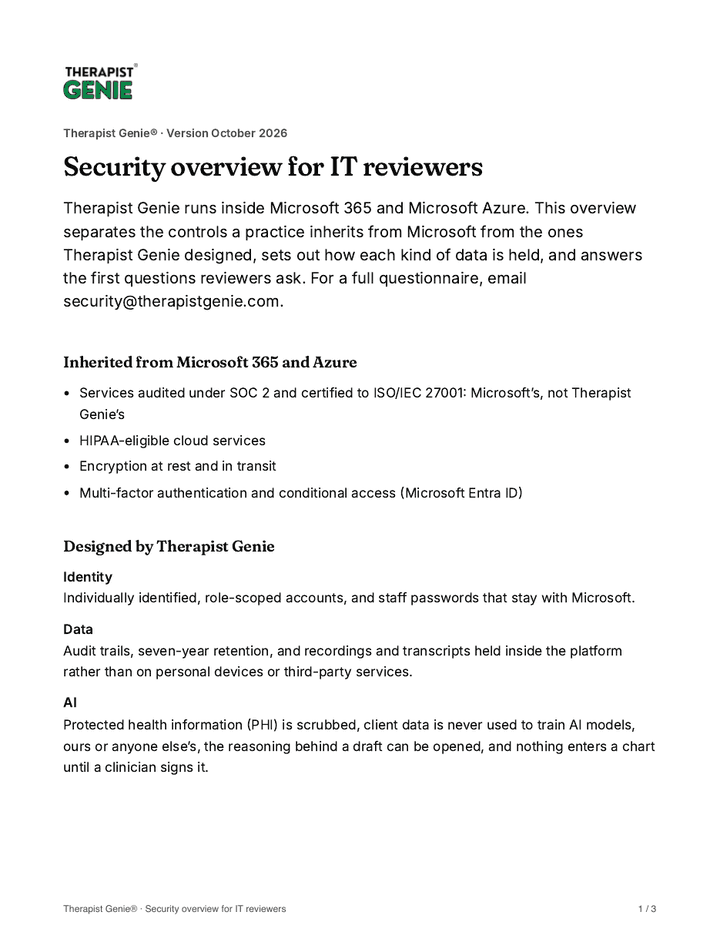
Download the overview for IT reviewers (PDF)PDF, 3 pages
Do we have to be on Microsoft 365, and which plan do we need?
Yes. Therapist Genie® is built inside Microsoft 365, and that is where the sign-in security, Microsoft Teams video, Microsoft Outlook scheduling and file storage come from. A basic Microsoft 365 plan is enough, licensed from Microsoft. Copilot is optional and additive.
We use Google Workspace. Is that a dealbreaker?
You’ll need Microsoft 365 alongside it: scheduling runs in Outlook and sessions run in Teams. What you get in exchange is Microsoft’s identity and security underneath your clinical record, plus video, storage and collaboration in one subscription. Ask us to walk through what the move involves for your practice.
Which certifications apply?
The independent security audits belong to the Microsoft 365 and Microsoft Azure services Therapist Genie® is built on, and your practice inherits that environment. They are not certifications Therapist Genie® holds in its own name. The overview for IT reviewers sets out which controls are Microsoft’s and which are ours.
Do you sign a business associate agreement?
Yes, we sign a business associate agreement with customers. Ask us how it applies to your practice.
Is our clients’ data used to train AI?
No. Protected health information (PHI) is scrubbed, and client data is never used to train AI models, ours or anyone else’s. Practices pay for the service, which is what makes that promise possible.
Where is our data held, and for how long?
The clinical record (charts, notes, assessments and consents) is held inside the platform on Microsoft 365 and Azure services. Back-office files live in your practice’s own Microsoft 365 storage. Recordings and transcripts are held inside the platform, with seven-year retention and audit trails. For a security questionnaire, email security@therapistgenie.com and we’ll answer for each kind of data.
Security questionnaires and reports: security@therapistgenie.com. Privacy questions: privacy@therapistgenie.com.

Put us in front of your IT reviewer.
We’ll walk through sign-in security, the AI guardrails and how each kind of data is held, in the detail a security questionnaire needs.
AI is included, and we don’t charge for admin and support staff.